Best Free AI Tools for Content Creation in 2025
Why Free AI Tools for Content Creation Matter in 2025 The content creation machine never stops. Whether you're managing a blog, running social media, or buildin...
Wilmer KarlssonTarstad
Why Free AI Tools for Content Creation Matter in 2025
The content creation machine never stops. Whether you're managing a blog, running social media, or building an email strategy, the pressure to produce quality material consistently has become non-negotiable in 2025. And here's the reality: most teams don't have unlimited budgets for enterprise software.
That's where free AI tools shift everything. According to recent industry data, 85% of marketers now use AI writing tools, and the trend extends across B2B professionals and solo creators alike. These aren't stripped-down versions of expensive platforms anymore. Free tools now deliver legitimate enterprise-level capabilities without the enterprise price tag.
The real advantage isn't just cost savings, though that matters. It's accessibility. A solo founder can now access the same content generation, editing, and optimization features that Fortune 500 companies use. Small marketing teams can punch above their weight. In-house creators can focus on strategy instead of grinding through repetitive writing tasks.
But here's what separates successful creators from the rest: they don't rely on a single tool. The magic happens when you layer complementary free tools into a coordinated system. One tool handles ideation, another polishes copy, a third optimizes for your audience. Together, they create a complete content production workflow that rivals expensive all-in-one platforms.

The Foundation: Best Free AI Writing Tools
The foundation of any content creation stack starts with writing tools that handle different stages of your workflow. These four free options cover ideation, drafting, refinement, and specialized formats, but they shine brightest when used together rather than as standalone solutions.
ChatGPT remains the most versatile entry point. Its free tier gives you access to GPT-4o mini, which handles everything from brainstorming blog outlines to generating full article drafts, social media captions, and email copy. The limitation is context length on complex projects, but for most creators, it's sufficient. Use it as your primary ideation and drafting tool.
Grammarly's free tier goes beyond basic spell-checking. According to VKTR's testing, it includes AI rewrite suggestions capable of generating fresh copy from scratch, making it valuable for polishing and reimagining existing content. It catches tone issues ChatGPT might miss and works across your entire writing ecosystem.
Copy.ai specializes in rapid short-form content. Trusted by 17 million users including companies like Siemens, Lenovo, and ServiceNow, it excels at generating headlines, product descriptions, and social media variations quickly. Its free tier includes enough credits for consistent experimentation, though limits apply to longer-form content.
Rytr appeals to creators who prefer structured templates over blank pages. Its library of templates guides you through writing specific content types, reducing decision fatigue. The free plan covers most formats, though output limits are tighter than competitors.
Here's the workflow: Start with ChatGPT for initial drafts and ideas. Feed outputs through Grammarly for refinement and tone adjustment. Use Copy.ai for rapid variations on short content. Lean on Rytr when you need template guidance for unfamiliar formats. This combination covers every stage of content creation without redundancy, letting each tool do what it does best.
Research and Intelligence: Perplexity for Data-Driven Content
Most content creators rely on ChatGPT for research, then spend hours fact-checking because the training data cuts off in early 2024. That's where Perplexity fills the gap.
Perplexity pulls real-time information from the web and cites its sources, making it essential for research-heavy content. You ask a question, and it doesn't just answer, it shows you exactly where the data came from with clickable source links. This eliminates the guesswork when you need current statistics, recent news, or verified facts for your articles.
Here's how to integrate it into your workflow: start with Perplexity for initial research and fact-gathering. Use it to validate claims before writing, especially for blog posts, whitepapers, or thought leadership pieces where accuracy matters. The free tier is surprisingly capable; you get multiple searches and access to recent web data without hitting a paywall immediately.
The real power emerges when you pair it with ChatGPT. Generate your first draft in ChatGPT, then cross-reference key claims in Perplexity. Found a statistic that needs verification? Perplexity will surface the original source. Need the latest industry numbers? It retrieves them in seconds with citations ready to use.
This two-tool approach keeps your content both original and credible. You're not relying on outdated training data, and you're not manually hunting through search results. Your research becomes faster, your sources become verifiable, and your confidence in publishing increases significantly.
Visual Content Creation: Canva, DALL-E, and Image Generation
Here's your section:

If you've ever stared at a blank design canvas and felt completely lost, you're not alone. The good news: you don't need Photoshop skills or a design degree to create professional-looking visuals anymore.
Canva's Magic Design feature does something genuinely useful: it generates on-brand graphics, presentations, or social posts in no time at all. Simply describe what you need, and it produces multiple options instantly. This works beautifully for LinkedIn headers, blog post covers, and social media tiles. The free tier includes thousands of templates and design elements, so you're rarely limited by budget constraints.
For truly custom visuals, DALL-E steps in where stock photos fall short. It turns text prompts into original images, letting you create custom visuals without relying on stock libraries. Need an illustration that perfectly matches your brand voice? Describe it, and the tool delivers. This eliminates the frustration of finding the "almost right" stock image.
The real value here is consistency and speed. You're no longer hunting for matching images across platforms or waiting days for designer feedback. A blog post that would typically need separate graphics for the header, social promotion, and email can now be fully visualized in minutes. Your LinkedIn profile, Instagram feed, and website can maintain a cohesive visual identity without the usual production overhead.
Both tools have free versions that actually work for serious content creators. You get real functionality without watermarks or severe restrictions. Combined with your written content, these visual tools complete your content stack, transforming text into a full multimedia package that performs better and takes less time to produce.
Social Media Content at Scale: Copy.ai, Rytr, and Platform-Specific Tools
When you're managing multiple social channels, manually writing posts for each platform becomes a time sink. Copy.ai and Rytr solve this by generating variations of the same core message in seconds, letting you maintain consistency while adapting tone and format to each audience.
Copy.ai excels at rapid ideation across formats. Feed it a topic, and it produces blog intros, social captions, email subject lines, and ad copy without breaking a sweat. The real advantage is its tone flexibility; you can generate the same message in professional, casual, or witty variations without rewriting from scratch. Copy.ai generates everything from blog intros to social ads in seconds with flexible tone options, making it particularly useful for creators juggling multiple brand voices.
Rytr takes a template-first approach, which creates natural consistency across your content calendar. Its built-in frameworks for LinkedIn posts, Instagram captions, and Twitter threads ensure you're following platform best practices without thinking about it. For LinkedIn specifically, this matters; the platform rewards certain structural patterns, and Rytr's templates account for those nuances.
The batch-creation workflow is where real time savings happen. Spend 30 minutes generating two weeks of social content instead of writing daily. Write your core ideas once, generate five variations per idea, then pick the strongest versions. This approach lets you maintain a posting schedule while actually having time for engagement and strategy.
Both tools offer free tiers that are genuinely functional, not just limited samples. Test them with your actual content pillars before deciding if paid features fit your workflow. For LinkedIn-focused teams at growth-stage companies, this efficiency multiplier directly impacts how much thought leadership you can actually publish.
Video Content: Pictory, Lumen5, and Converting Text to Video
Video content commands attention in ways that static posts simply can't match. If you're sitting on a library of blog posts, articles, or written guides, you're already halfway to a thriving video content strategy.
Pictory and Lumen5 turn that written work into polished short-form videos without requiring you to learn complex editing software. Pictory converts blog content into 30-second TikToks and Instagram Reels by automatically identifying key points, adding matching visuals, and syncing text-to-speech narration. Feed it a how-to article, and within minutes you have a formatted video ready for social platforms. Lumen5 works similarly, transforming articles or scripts into professional-looking videos with minimal effort. Both tools handle the heavy lifting: stock footage selection, transitions, pacing, and text overlays.

The multiplier effect is real. Video content drives substantially higher engagement than static posts, which means your existing content suddenly reaches more people when repurposed into video format. This isn't about creating entirely new material; it's strategic recycling that maximizes your content investment.
Both platforms offer free tiers generous enough to test workflows and build confidence before considering paid upgrades. Start with your best-performing blog posts. Convert three or four into videos and watch the engagement metrics. You'll quickly see which formats resonate with your audience, then scale what works. That's the complete stack approach in action: write once, distribute everywhere.
LinkedIn-Specific AI Tools for Professional Branding
Building a strong LinkedIn presence requires consistency, but manually crafting posts daily drains time you could spend on strategy. Free LinkedIn post generators solve this by helping you batch-create content that fits the platform's unique algorithm and character constraints.
Tools like Hootsuite's LinkedIn post generator let you generate multiple posts in one session, then schedule them across weeks. This approach keeps your profile active without the daily scramble. The key is using AI as a starting point, not a finish line. Your authentic voice matters more on LinkedIn than anywhere else; audiences detect generic, robotic content immediately.
The real advantage is maintaining a consistent professional voice while scaling output. AI handles the structural heavy lifting (opening hooks, call-to-action placement, optimal length), freeing you to inject your expertise and perspective. You're not letting AI write your thought leadership; you're using it to amplify it.
LinkedIn permits AI-generated content but requires authenticity, transparency, and value delivery. This means disclosing when you've used tools, while ensuring every post reflects genuine insights from your work. The best approach: use AI to generate frameworks, then customize with specific examples, data points, or lessons from your industry experience.
Batch creation also reduces decision fatigue. Spend two hours weekly generating and refining posts, then let the scheduler handle distribution. This consistency signals reliability to your network and improves visibility in LinkedIn's feed algorithm, which rewards regular engagement. Combined with other tools in your content stack, LinkedIn generators become part of a sustainable publishing rhythm that doesn't require constant manual effort.
Building Your AI Content Creation Stack: Integration and Workflow
The real power of free AI tools emerges when you stop treating them as individual solutions and start building them into a system. Think of it like a content assembly line where each tool handles what it does best.
Start with research. Before writing a single sentence, use Perplexity to gather current information and verify facts. This foundation prevents outdated claims and gives you confidence in your content's accuracy. Spend 10-15 minutes here; it saves hours of fact-checking later.
Next, move to drafting. ChatGPT works well for long-form pieces like blog posts, while Copy.ai excels at punchy social media content or ad copy. Choose based on your output format, not just preference. Feed Perplexity's research directly into your drafting tool to maintain consistency.
Once your draft exists, hand it to Grammarly. This step isn't just about catching typos; it's about refining tone and ensuring your voice comes through clearly. The tool learns your style and becomes more valuable with each piece.
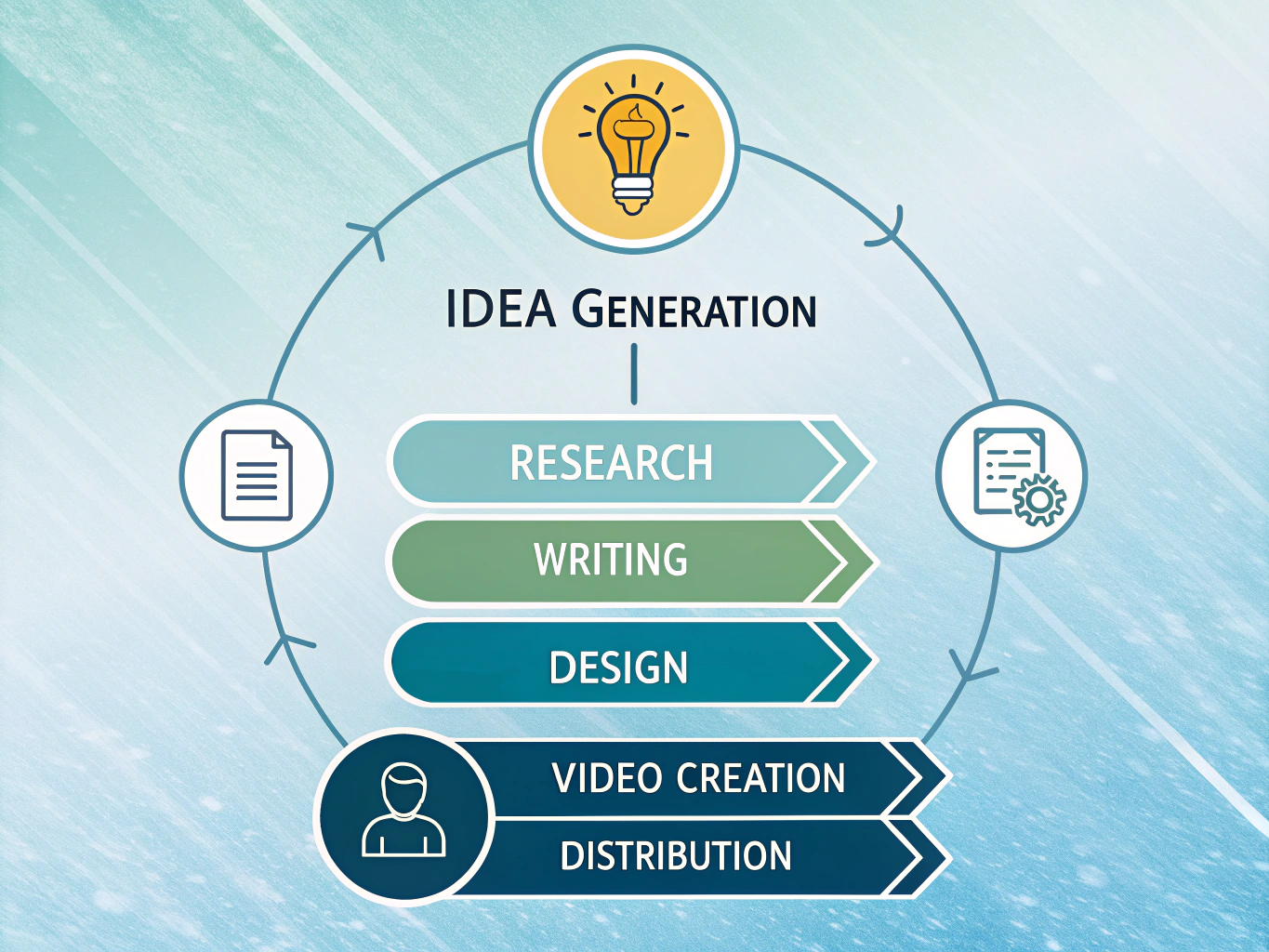
While text develops, create visuals in parallel. Canva handles polished graphics for most needs; DALL-E works when you need something more custom. Parallel workflows compress timelines significantly.
Finally, repurpose strategically. Pictory or Lumen5 transforms blog posts into video clips for platforms like LinkedIn or TikTok. Before publishing anywhere, optimize each piece for its specific platform: adjust length, add platform-native hashtags, and format accordingly.
This isn't about using every tool on every project. It's about knowing which tool solves which problem and assembling them into your unique workflow.
Limitations, Best Practices, and Maintaining Your Brand Voice
Here's the reality: free AI tools are powerful, but they're not magic. They generate drafts, not finished content. Think of them as a creative partner, not a replacement for your judgment.
The biggest pitfall is publishing AI output without human refinement. Generic phrasing is common. Free tools often produce content that sounds like it was written by, well, an AI. Your brand voice gets lost in the process. You need to inject personality, context, and perspective that only you understand about your audience.
Fact-checking is non-negotiable. AI hallucinates statistics and misquotes sources regularly. Always verify claims, especially numbers and citations, before publishing. A single wrong statistic damages credibility far more than admitting you used AI.
Free tiers come with real constraints. Monthly token limits, output caps, and feature restrictions mean you'll hit ceilings quickly once you scale. Plan accordingly and budget for upgrades if content creation becomes central to your strategy.
Getting the best results requires specificity. Vague prompts produce vague content. Instead of "write about social media," try "write a 500-word guide on LinkedIn strategy for B2B SaaS founders who've never posted before." Better input equals better output.
The sweet spot is collaboration. Use AI to brainstorm, generate rough drafts, and overcome blank-page paralysis. Then do the real work: edit ruthlessly, fact-check thoroughly, and add the human insight that makes your content worth reading. That combination beats either humans or AI working alone.
Conclusion: Your Free AI Content Creation System Starts Today
You've seen the tools. You understand how they fit together. Now comes the part that actually matters: starting.
The barrier to professional content creation has genuinely collapsed. Five years ago, producing polished, consistent content required either a team or a budget. Today, free AI tools put that same capability in your hands. But capability without action is just potential.
Here's what works: pick one tool. Master it for a week. ChatGPT for outlines, Claude for drafting, Canva for visuals, whatever resonates with your workflow. Once that feels natural, add a second tool. Build your stack incrementally, not all at once. You'll discover which combinations actually save you time versus which ones just add friction.
The magic happens at the intersection. Your outline tool feeds into your writing tool, which informs your design tool. Each layer adds polish without multiplying your effort. But remember this part: AI handles the heavy lifting, but your voice, perspective, and judgment are irreplaceable. The tools amplify what's distinctly yours; they don't create it.
If you're focused on professional growth, this matters especially on LinkedIn. Consistent, thoughtful content builds credibility and connections faster than sporadic posts. Free AI tools let you maintain that consistency without burning out.
The future of content creation isn't human or AI. It's both working together, with you making the decisions that matter.
Start today. Pick one tool. Write something.