LinkedIn for Customer Service: Strategies That Drive Business Growth
Last Updated: March 21, 2026 TL;DR: Key Takeaways LinkedIn is a valuable customer service channel for B2B companies seeking engagement Premium support includes...
Wilmer KarlssonTarstad
Last Updated: March 21, 2026
TL;DR: Key Takeaways
- LinkedIn is a valuable customer service channel for B2B companies seeking engagement
- Premium support includes live chat, faster response times, and dedicated assistance
- Proactive customer engagement on LinkedIn builds loyalty and reduces churn
- Automation tools like GetViews.AI help scale customer interactions without sacrificing quality
- Strategic use of LinkedIn messaging and content creates competitive advantage
What Is LinkedIn Customer Service and Why It Matters
When you think about LinkedIn customer service, you might picture submitting a ticket to LinkedIn's Help Center when your account gets locked. That's one part of the equation. But here's what's actually driving real business growth: forward-thinking B2B companies are flipping the script entirely, using LinkedIn itself as a direct customer service and engagement channel.
The distinction matters because it changes how you think about the platform. LinkedIn offers support resources for users, sure. But the real opportunity sits elsewhere. Your customers are already spending time on LinkedIn. They're scrolling through feeds, reading industry updates, and engaging with content from companies they trust. By meeting them there with responsive, helpful customer service, you're not just solving problems; you're building relationships at scale.
With over 900 million users on the platform, the potential reach is staggering. But numbers alone don't tell the story. What matters is that B2B buyers increasingly expect brands to be accessible and responsive where they spend their time. When a prospect or customer leaves a comment on your post, gets stuck with a product question, or needs support, responding promptly on LinkedIn signals that you actually care about engagement, not just landing deals.
This approach fundamentally differentiates you from competitors who treat LinkedIn as a one-way broadcasting channel. Real customer service on LinkedIn builds credibility and trust. It transforms your company from a distant vendor into an accessible partner. Prospects watch how you treat your existing customers. When they see thoughtful, genuine responses to questions and concerns, they're more likely to trust you with their business.
The bottom line: LinkedIn customer service isn't a side project or a nice-to-have. It's a core strategy for companies serious about B2B growth and long-term customer relationships.
Getting Support From LinkedIn: Official Channels and Response Times
Before you can leverage LinkedIn as a customer service powerhouse, it helps to understand how to get support from LinkedIn itself. The platform offers multiple channels depending on your needs and account type.
The LinkedIn Help Center is your first stop for most issues. It houses over 1,500 articles covering everything from account settings to troubleshooting connection problems. For straightforward questions, this self-service route often solves problems in minutes without waiting for human support.
For more complex issues, you can submit support tickets through your Help Center account. These typically receive responses within 24 to 72 hours, depending on complexity and your account status. Be specific in your ticket description to speed up resolution.
If you're a Premium member, you gain access to live chat support directly from the Help Center. This real-time option is invaluable when you need immediate assistance with account issues or technical problems affecting your customer service efforts.
Understanding these support channels sets the foundation for what's truly valuable: using LinkedIn itself as your customer service engine. Once you're confident navigating the platform's own support ecosystem, you're ready to build customer relationships and engagement that drive measurable business results.
LinkedIn Premium and Career Premium: Enhanced Support Tiers
LinkedIn offers different subscription tiers, each with distinct support capabilities that affect how quickly you can resolve customer issues and gather insights. Understanding these options helps you choose what aligns with your business goals.
LinkedIn Premium provides priority support and live chat access, which matters when you need faster response times on support tickets. This tier works well for professionals managing customer relationships at scale, giving you direct channels to resolve issues without waiting days for email responses. You also get access to exclusive features like InMail, which lets you reach prospects and customers directly in their inbox.
Career Premium operates differently, focusing on direct connections with hiring managers and recruiters. While it's primarily marketed toward job seekers, B2B professionals sometimes use it to build relationships with decision-makers in their target accounts. It's less about customer support infrastructure and more about networking depth.
The free tier covers basic customer engagement through standard messaging and commenting, suitable if you're building your presence gradually or testing LinkedIn's potential for your team. However, you'll face standard response times and limited outreach capabilities.
Your choice depends on volume and complexity. If you're managing dozens of customer conversations daily or need rapid issue resolution, Premium's priority support justifies the investment. For smaller operations or those just starting with LinkedIn customer engagement, the free tier lets you develop your strategy before upgrading. The key is viewing these subscriptions not as costs but as tools that directly impact how customers perceive your responsiveness and professionalism.
Using LinkedIn as Your Customer Service Channel
LinkedIn messaging transforms your customer support operation into a direct, personal channel. Instead of waiting for emails or navigating support tickets, your customers can reach you instantly through a platform they already use daily. This immediacy builds trust and shows you're genuinely accessible, not hiding behind automated systems.
Your company page becomes a powerful FAQ hub. Rather than burying answers in help documentation, post content that addresses common questions your customers ask. When someone lands on your page, they see real solutions to real problems. This approach does double duty: it reduces repetitive support inquiries while establishing your company as a knowledgeable resource.
LinkedIn articles and posts let you tackle customer concerns at scale. If you notice a pattern in questions or objections, write a thoughtful post addressing it. Your entire network sees you solving problems in real time. This public problem-solving builds credibility faster than any sales pitch ever could.
Engaging with customer comments on your posts creates community momentum. When you respond thoughtfully to every comment, you signal that feedback matters. Customers become advocates who actively participate in conversations, extending your reach organically. This community-building approach differentiates you from competitors who treat LinkedIn as a broadcast channel.
Proactive support on LinkedIn means spotting issues before customers formally complain. Monitor mentions of your industry, your company, and your products. Jump into conversations where someone needs help. This visibility transforms you from a reactive service provider into a partner genuinely invested in customer success.
Best Practices for LinkedIn Customer Service Excellence
Treating LinkedIn as a legitimate customer service channel means committing to consistent, thoughtful communication. Your response time matters more than you might think: aim to reply to customer inquiries within 24 hours. This signals that you take their concerns seriously and builds trust in your brand.
Tone is equally critical. Keep your voice professional yet conversational, avoiding robotic corporate language that puts distance between you and the person reaching out. A customer asking about product features doesn't need formal jargon; they need clarity and genuine helpfulness. Show personality while maintaining professionalism.
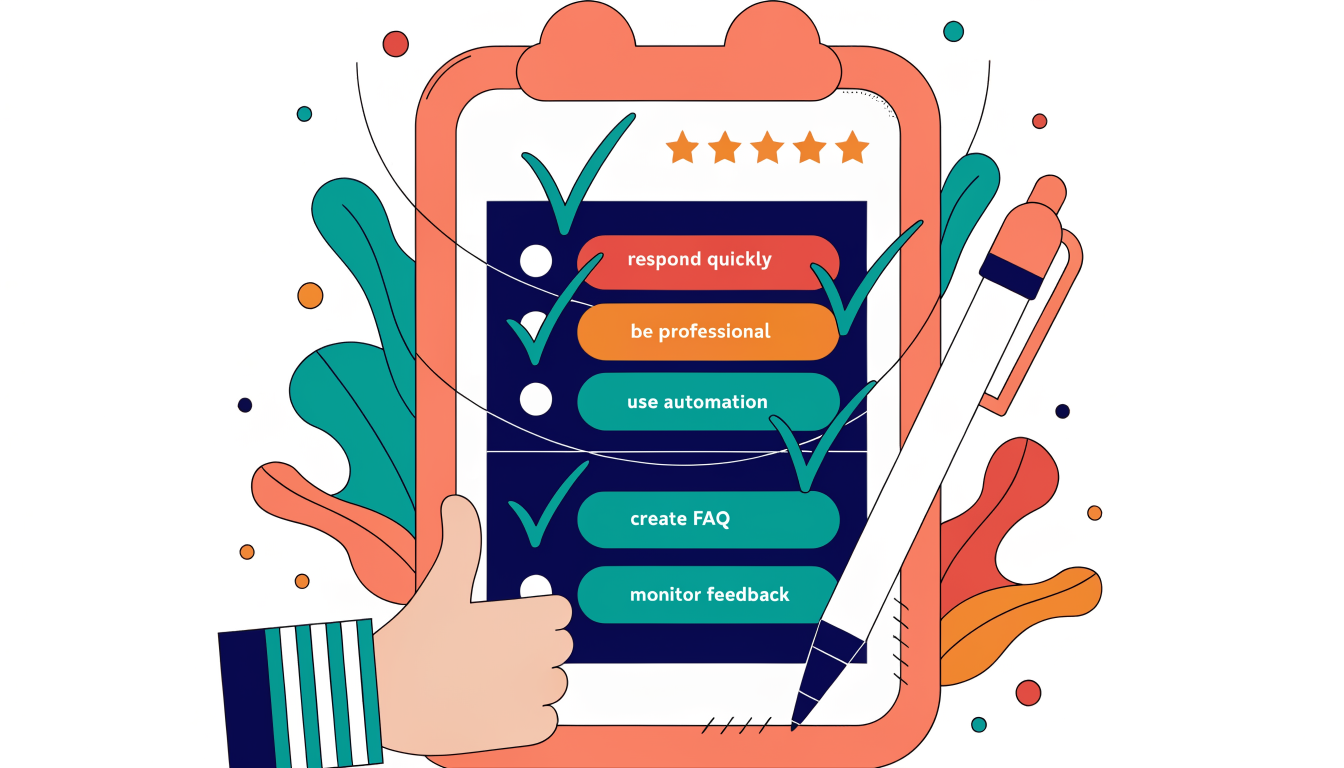
Automation doesn't mean impersonal responses. Use LinkedIn's tools to acknowledge inquiries instantly, then follow up with personalized answers. Create a resource library of FAQ content addressing your most common questions. This approach scales your efforts without sacrificing the human touch your customers expect.
Finally, treat comments and mentions as goldmines for feedback. Monitor these spaces actively and respond publicly when appropriate. This demonstrates accountability and shows other prospects that you genuinely care about customer success. When you handle issues transparently on LinkedIn, you're essentially building social proof that your company stands behind its commitments.
Scaling Customer Service with LinkedIn Automation and Tools
Here's the reality: your customer service team can't manually respond to every LinkedIn inquiry, especially as your business grows. The volume becomes unmanageable, response times slip, and opportunities fall through the cracks. That's where automation becomes essential, not optional.
Modern automation tools let you handle high volumes of customer interactions without sacrificing the personal touch that builds relationships. AI-powered responses can be tailored to individual customer needs, maintaining relevance and warmth while freeing your team from repetitive tasks. You're not replacing human judgment; you're eliminating the bottleneck that prevents your best people from tackling complex issues that actually need their expertise.
The strategy works like this: automation handles initial inquiries, qualification, and frequently asked questions. Your team focuses on nuanced conversations, problem-solving, and relationship building. This division of labor dramatically improves both efficiency and customer satisfaction.
Tools designed specifically for LinkedIn integration streamline this entire workflow. They connect directly to your LinkedIn inbox, allowing you to set up response templates, automate follow-ups, and segment conversations based on priority. The result is faster resolution times and more consistent engagement across your customer base.
The business impact is tangible. You reduce response time bottlenecks, handle more inquiries with your existing team, and create space for strategic customer conversations. Your sales and service teams spend less time on administrative tasks and more time on activities that directly influence revenue.
The key is choosing solutions that understand LinkedIn's ecosystem and maintain authentic communication. Automation should enhance your customer service capability, not replace the human elements that customers actually value. When implemented thoughtfully, it becomes your competitive advantage in scaling customer relationships without scaling headcount proportionally.
FAQ: Common Questions About LinkedIn Customer Service
How long does LinkedIn support take to respond?
If you submit a support ticket through LinkedIn's help center, expect a response within 24 to 72 hours, depending on complexity. For urgent account issues, this timeline can occasionally stretch longer. That's why building a strong community on your page matters; your engaged followers often help answer questions faster than official support.
What's the difference between LinkedIn Premium and Career Premium support?
LinkedIn Premium offers enhanced messaging and search capabilities for professionals, while Career Premium is specifically designed for job seekers. Neither provides priority customer service support. Both tiers give you standard support access, so don't expect faster response times just because you're a paying member.
Can I automate my LinkedIn customer service responses?
Partial automation works, but use it strategically. You can set up message templates for common inquiries, which saves time without feeling robotic. However, customers appreciate personalized responses. The key is mixing efficiency with authenticity; automate the routing and initial acknowledgment, then handle substantive replies manually.
How do I handle negative feedback on LinkedIn?
Respond promptly and professionally, even when criticism stings. Take the conversation to direct messages if it involves sensitive details. Show you're listening, offer solutions, and follow up publicly once resolved. This transparency builds trust with prospects watching the exchange.
What's the best way to respond to customer inquiries?
Answer within 24 hours, keep responses concise, and use clear language. Reference specific details from their message to show you're paying attention. When appropriate, direct them to your website or support portal rather than conducting lengthy troubleshooting in comments.
Key Takeaways: Transform Your LinkedIn Customer Service Strategy
LinkedIn has quietly become one of the most underutilized customer service channels in B2B business. The companies winning right now aren't treating it as just another social network; they're leveraging it as a direct line to their customers, prospects, and industry peers.
Here's what separates high-performing B2B teams from the rest: they respond fast, they sound human, and they solve problems where customers actually spend their time. LinkedIn Premium unlocks messaging features that make this possible at scale. Your response speed directly impacts how customers perceive your brand, and every interaction either builds loyalty or erodes it.
The real competitive advantage comes from combining strategy with smart tools. Automation doesn't mean robotic responses; it means handling routine inquiries efficiently so your team can focus on complex customer needs. When you free up time on repetitive tasks, you create space for genuine relationship building.
Your next move is clear: audit how you're currently using LinkedIn for customer engagement. Are you responding to comments? Monitoring direct messages? Using your network strategically? Start with one channel, master it, then expand. Track your response times, note which interactions convert to business outcomes, and refine your approach based on data.
The businesses that treat LinkedIn as a customer service powerhouse rather than a broadcasting platform will own their markets. Your customers are already there. The question is whether you're meeting them.
Ready to Scale Your LinkedIn Customer Service? Start With GetViews.AI
You've seen how LinkedIn transforms customer service from a reactive support channel into a proactive growth engine. The strategies work, but only if you actually implement them. That's where automation becomes your competitive advantage.
Scaling personalized engagement across LinkedIn without burning out your team requires the right tools. AI-powered platforms handle the repetitive work, letting your team focus on relationship-building and complex problem-solving. You maintain that human touch while multiplying your capacity to respond, engage, and convert prospects into loyal customers.
The best part? You don't need to hire additional staff or overhaul your existing workflows. Start by exploring how to optimize your approach with resources like LinkedIn engagement tips for 2025 and LinkedIn analytics for business growth. These insights guide your strategy while automation handles the execution.
Your LinkedIn customer service advantage starts today. Stop managing conversations manually and start scaling them intelligently.