Best Time to Post on LinkedIn: Discover the best time to post on linkedin
Discover the best time to post on linkedin to maximize visibility and engagement with data-backed timing insights and practical posting windows.
Wilmer KarlssonTarstad
If you're looking for a silver bullet, the general consensus is that the best time to post on LinkedIn is mid-week, smack dab in the middle of standard business hours. Most professionals are scrolling their feeds either right before the workday kicks off, during their lunch break, or as they start to wind down in the afternoon.
The Golden Hours for LinkedIn Engagement
While the perfect time is always unique to your audience, tons of data gives us a powerful starting point. These "golden hours" are when the platform is buzzing with peak activity, giving your content the best shot at immediate visibility.
Think of these windows as the low-hanging fruit of your content strategy.
General Recommended LinkedIn Posting Windows (Local Time)
Here’s a look at the most effective, research-backed time slots for capturing the broadest professional audience.
| Day of the Week | Morning Slot | Midday Slot | Afternoon Slot |
|---|---|---|---|
| Tuesday | 9 AM - 11 AM | 12 PM - 2 PM | 3 PM - 5 PM |
| Wednesday | 9 AM - 11 AM | 12 PM - 2 PM | 3 PM - 5 PM |
| Thursday | 9 AM - 11 AM | 12 PM - 2 PM | 3 PM - 5 PM |
Mondays can be a toss-up as people are busy catching up, and Fridays often see a drop-off as everyone heads into the weekend. The sweet spot is clearly that Tuesday-Thursday block.
Why Do These Times Actually Work?
So, what makes these windows so effective? It’s all about syncing up with the rhythm of the typical professional's day.
- Mornings (9 AM - 11 AM): People are settling in at their desks, sipping coffee, and catching up on industry news. They're receptive to new ideas before their calendars get completely swamped.
- Midday (12 PM - 2 PM): This is prime scrolling time. The lunch break offers a mental reset, and users are actively looking for interesting content to engage with.
- Afternoons (3 PM - 5 PM): As the workday winds down, focus starts to drift. Professionals often hop back on LinkedIn to network, read longer articles, or see what their connections are up to.
Targeting these peak times dramatically increases the odds of your post being seen right away. That initial visibility is a crucial signal to the LinkedIn algorithm that your content is valuable, which helps boost your impressions on LinkedIn and extend your reach.
For a broader look at how timing works across different platforms, you might find this an experiment on the best days for social media posts pretty insightful.
But remember, these times are your baseline. The real magic happens when you start testing and dialing in these windows for your specific audience.
Why Generic Posting Schedules Fall Short
Let's be honest, we've all seen those infographics claiming the "best time to post on LinkedIn" is Tuesday at 10 AM. While those general guidelines are a fantastic starting block, treating them as gospel is one of the most common mistakes I see people make.
The idea of a single "best time" is a myth. Why? Because every audience is completely different. Unlocking real, sustained engagement means you have to move beyond those broad recommendations and get to know your specific followers.
The digital habits of your audience are shaped by dozens of little things—their industry, their specific job title, and where they are in the world. A software engineer in Austin, Texas, scrolls through their feed on a totally different rhythm than a marketing executive based in Singapore. Rely on generic advice, and you’re probably missing them both.
Your Audience Isn't an Average
Thinking like a strategist starts with one key admission: averages can be incredibly misleading. A posting schedule that crushes it for a B2C retail brand targeting HR managers will almost certainly flop for a fintech startup trying to get in front of CTOs.
Their work pressures, meeting schedules, and even their reasons for opening LinkedIn are fundamentally different.
For instance, plenty of industries operate way outside the typical 9-to-5 workday. Recent data shows that while many professionals are active early in the morning, some sectors see unique engagement peaks at completely different times.
Different days and times cater to varying industries and user behavior on LinkedIn. While the best overall times often fall between 4 and 6 AM on Tuesdays and Wednesdays, industry-specific data shows sectors like construction and manufacturing see engagement spikes later, such as 2 to 4 PM on Mondays.
You can see more of this industry-specific data in Hootsuite's 2025 findings. It's solid proof that the best time to post on LinkedIn is less about what a blog post says and more about what your own data tells you.
Key Variables That Break the Generic Mold
If you really want to dial in your schedule, you have to look at your audience's unique behavior. These are the critical variables that make any one-size-fits-all approach totally ineffective:
- Time Zones: This is the big one. If you have a global audience, your 9 AM post might be hitting a key demographic right at midnight. You have to prioritize your most valuable geographic segments.
- Industry Norms: A healthcare professional’s online availability is worlds apart from a creative director's. One might be scrolling LinkedIn during a short break between patients, while the other browses during a creative lull in the afternoon.
- Seniority Levels: C-suite executives often have a different pattern altogether. Many check LinkedIn very early in the morning or late in the evening, well outside the standard midday rush of junior and mid-level professionals.
Think of those generic schedules as your starting block, not the finish line. They give you a hypothesis. Now, it's time to start testing to find the posting times that perfectly match when your audience is actually online and ready to engage.
How to Find Your Unique Peak Posting Times
Relying on generic, industry-wide posting advice is like using a map of New York City to find your way around London. Sure, you might end up in the right general area, but you're almost guaranteed to miss your specific destination.
The real secret to maximizing engagement isn't about finding a magic, one-size-fits-all schedule. It's about listening to what your own audience is telling you. It means shifting from broad advice to a strategy built specifically for the people who follow you.
Your ideal posting time isn't a mystery; it's hiding in plain sight within your own LinkedIn analytics. By digging into that data, you can build a schedule that aligns with your audience's habits, not just the habits of some "average" professional.
This data-driven approach is what turns your content strategy from a guessing game into a reliable system for growth.
Tapping into Your LinkedIn Analytics
Your journey to find the perfect posting time starts right inside your LinkedIn Page’s native analytics. This is your ground truth, offering a direct, unfiltered look at your audience's behavior.
To get started, head over to your Company Page and click on the "Analytics" tab. You'll want to focus on two key areas:
- Followers: This is where you get the demographic breakdown of your audience—their job titles, industries, and, most importantly, their geographic locations. If you notice a big chunk of your audience is in a different time zone, that’s a huge clue that you need to adjust your schedule.
- Visitors: This dashboard shows you the exact days and times your page gets the most traffic. While this tracks everyone who visits (not just followers), it’s a powerful indicator of when people are actively looking for your brand on the platform.
Use this info to form an initial hypothesis. If your analytics show a clear spike in visitor traffic on Tuesdays and Thursdays around 11 AM, that's your new starting point.
Designing a Simple A/B Test
With a data-backed hypothesis in hand, it's time to test it in the real world. You don’t need a complicated setup for this. The whole point is to compare two different time slots to see which one performs better.
Here’s a simple way to structure your test:
- Find Two Similar Posts: The content needs to be comparable in format and topic. You're testing the time, not the creative, so you want to keep that variable as consistent as possible. A couple of text-and-image posts about a recent industry trend would work perfectly.
- Schedule for Different Times: Post the first piece of content at your usual time (let's say, Wednesday at 2 PM). Then, schedule the second, similar post for your new, data-informed time (Thursday at 11 AM).
- Measure and Compare: Give each post about 24-48 hours to breathe, then dive into the metrics. Compare the impressions, reactions, comments, and click-through rates for both.
This simple workflow—moving from general advice to specific, tested schedules—is the core of an optimized strategy.
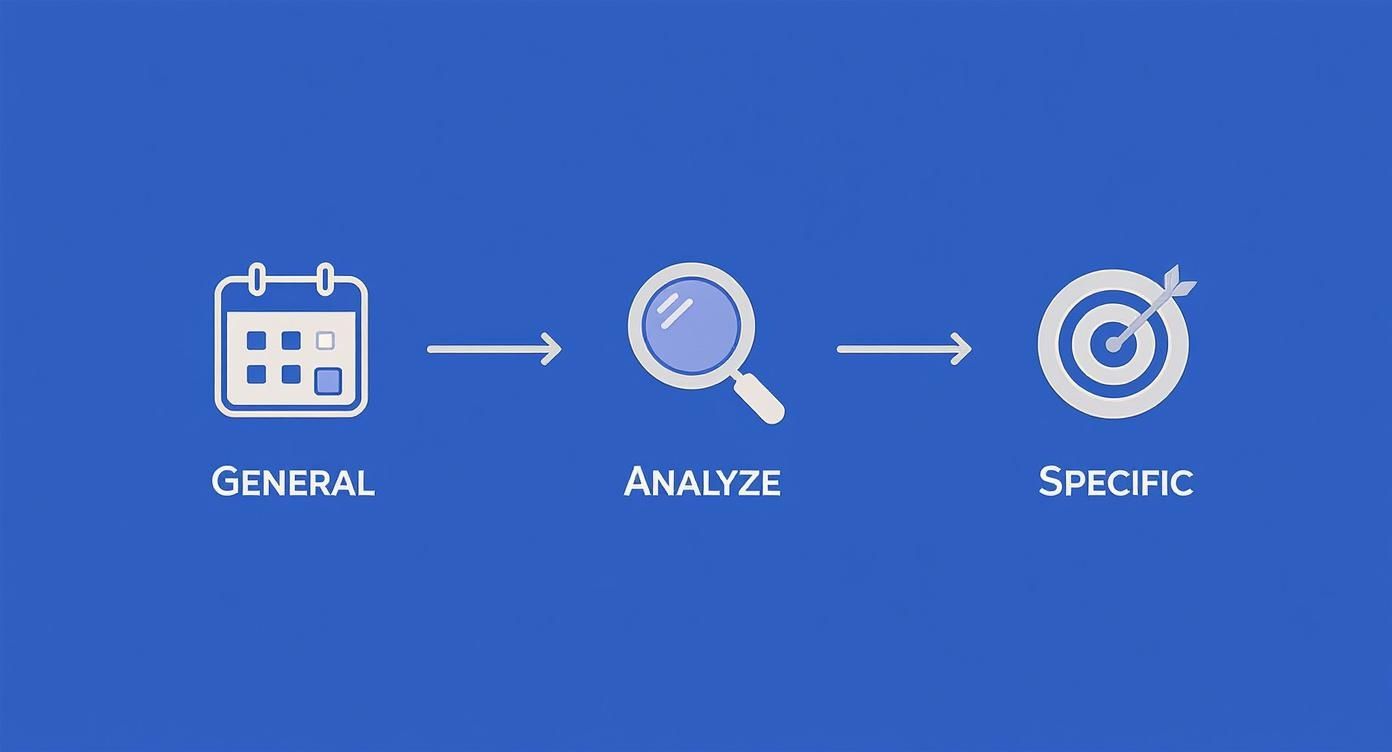
Analyzing your specific audience is the crucial step that bridges the gap between a generic schedule and a truly effective one. Running these small experiments consistently is what turns good timing into great results. You'll find it's much easier to stay organized once you learn how to create a content calendar that maps out your experiments ahead of time.
Key Takeaway: Don't just run one test and call it a day. The LinkedIn algorithm has its quirks, and a single post can always be an outlier. Repeat your A/B test over several weeks to gather enough data to spot a reliable pattern.
This iterative cycle of analyzing, testing, and measuring is the only foolproof way to discover your true peak posting times. It replaces guesswork with a concrete, repeatable method for making sure your content lands in front of the right people at the right moment.
Matching Your Content Type to the Right Time Slot
Finding the best time to post on LinkedIn is a huge step forward, but it's only half the battle. Just as important is asking, "What am I posting at that time?" The content you share has to line up with where your audience's head is at.
Think about it this way: trying to hand someone a detailed, 10-page report while they’re rushing to catch a train is a losing game. The information might be gold, but they don't have the mental space to engage with it. The same logic applies directly to your LinkedIn feed.
A quick industry news update is perfect for the morning commute scroll. But that deep-dive thought leadership piece or a complex case study? That’s better saved for a midday break or late afternoon when your audience actually has the bandwidth to digest it.
Aligning Content with Audience Mindset
To truly optimize your schedule, you have to map your content formats to specific time slots. It's all about matching the energy and focus required for each post to your audience's daily rhythm.
Here’s a simple way to think about it:
- Quick Updates & News: Best for early mornings (8 AM - 10 AM). People are catching up, scanning for high-level info to start their day.
- Thought Leadership & How-To Guides: Ideal for midday (12 PM - 2 PM) or late afternoon (3 PM - 5 PM). This is when your audience has a moment to breathe—and read—during a lunch break or as their day winds down.
- Company Culture & Behind-the-Scenes: Great for Friday afternoons. The mood is lighter, and content that builds a personal connection just hits differently as people get ready for the weekend.
This isn't just about boosting initial views. When you align your content with the moment, you're signaling high relevance to the LinkedIn algorithm. That can dramatically expand your reach.
Matching the message to the moment makes it incredibly easy for your audience to engage, turning a passive scroll into an active click, comment, or share.
Not all content is created equal, and neither are the time slots you post in. The key is to strategically align the type of content you're sharing with the most receptive audience mindset. Below is a quick guide to help you match your message to the moment for maximum impact.
Matching Content Type to Optimal Posting Windows
| Content Type | Primary Goal | Recommended Posting Window | Rationale |
|---|---|---|---|
| Industry News & Quick Takes | Visibility & Relevance | Tue-Thu, 8 AM - 10 AM | Professionals are catching up on the day's news and want scannable, timely information. |
| In-Depth Articles & Guides | Thought Leadership | Wed-Thu, 12 PM - 2 PM | Lunch breaks offer a window for deeper reading and learning when focus is higher. |
| Case Studies & Client Wins | Social Proof & Credibility | Tue & Wed, 3 PM - 5 PM | Decision-makers are often in a review or planning mindset later in the day, making them receptive to proof of results. |
| Company Culture & Team Posts | Employer Branding & Connection | Fri, 1 PM - 3 PM | The mood is lighter heading into the weekend, making people more open to human-centric, feel-good content. |
| Polls & Questions | Engagement & Audience Insights | Mon, 10 AM - 12 PM | Great for kicking off the week with an interactive post that requires low effort to engage with. |
By using this framework, you're not just posting at a "good" time; you're delivering the right kind of value when your audience is most likely to appreciate it.
Tackling the Time Zone Challenge
So, what happens when your audience is scattered across the globe? Posting at 9 AM in New York means it’s 6 AM in California and 2 PM in London. A single posting time will inevitably miss huge chunks of your follower base.
Instead of hunting for one perfect time, you have to prioritize. Dive into your LinkedIn Analytics and pinpoint your top three geographic regions.
If your audience is heavily concentrated in North America, you could schedule your most important posts for a time that hits both coasts during their workday, like 1 PM ET / 10 AM PT. For a truly global audience, you might need to post key content twice—once for the Americas and again for the EMEA region—to guarantee maximum visibility.
This is where tools like GetViews.AI can be a game-changer. You can schedule posts for different time zones and automatically amplify them to ensure they reach the right people at the right time. It removes the manual work and guesswork, letting you focus on creating great content while the platform handles optimal delivery. Ultimately, a smart content calendar accounts for what you post, when you post it, and where your audience is.
Tools and Tactics for Advanced Optimization
Once you have a data-backed schedule, the real work begins: continuous, relentless refinement. It's time to stop chasing vanity metrics like likes and start focusing on the numbers that actually move the needle for your business.
This is all about digging into your LinkedIn Analytics and tracking the key performance indicators that signal real progress. Is your post reach growing? Are click-through rates on your links improving month-over-month? These are the metrics that tell you if your strategy is truly working.
Establishing a Regular Testing Cadence
To avoid making knee-jerk decisions based on a single viral hit or a random flop, you need a consistent testing schedule. Think of it as a quarterly check-up for your entire LinkedIn strategy.
Set aside time every month or quarter to do a deep dive into your post performance. Hunt for patterns in your best content. Did posts published at a certain time of day consistently spark more comments or shares? This is the raw data that will fuel your next round of experiments.
The goal isn't to find one single "best time to post on linkedin" and stick with it forever. It's about building an agile system that adapts to your audience's evolving habits and the platform's algorithm.
This regular review process keeps your schedule from going stale. It ensures your strategy is sharp and aligned with what's working now, not what worked six months ago. For a deeper look at what makes a post successful, our LinkedIn post analyzer can give you incredibly detailed insights into your content's performance.
Automating and Amplifying Your Efforts
Let's be honest: manually tracking experiments, scheduling posts across different time zones, and analyzing all the data can become a full-time job. This is where third-party tools become non-negotiable for scaling your strategy and getting consistent results.
They handle the tedious parts, freeing you up to focus on what you do best—creating killer content.
To really get this down to a science, investing in one of the best social media scheduling tools can automate your posting and provide the analytics you need to pinpoint your ideal time slots. These platforms offer robust features that blow LinkedIn's native scheduler out of the water.
Here’s why advanced tools are a game-changer:
- Automated A/B Testing: Some tools can automatically test different publishing times and even headlines, taking all the manual guesswork out of optimization.
- Content Amplification: Platforms like GetViews.AI can automatically boost your top-performing posts, ensuring they break out of your immediate network and reach a wider, more targeted audience.
- Centralized Analytics: Get a clean, consolidated dashboard of all your metrics across every experiment. This makes it infinitely easier to spot trends and make smart, data-backed decisions.
For example, using GetViews.AI, you could set up an experiment to test the same post at 9 AM and 1 PM. The platform doesn't just schedule the posts; it analyzes the engagement data from both and tells you which time slot performed better for your specific audience.
This blend of smart automation and strategic amplification is how you turn your LinkedIn presence from a guessing game into a predictable growth engine.
Common Questions About LinkedIn Posting Times
Even with a data-backed plan, you'll still have questions pop up as you start fine-tuning your schedule. Nailing the perfect time to post on LinkedIn usually means working through a few common what-ifs.
Let's clear up some of the most frequent questions so you can post with confidence and get the most out of every piece of content.
Does Posting Frequency Affect the Best Time to Post?
Absolutely. How often you post completely changes how you should think about your time slots. There's a huge difference between posting daily and just a few times a week.
If you’re posting multiple times a day, your main goal is to space things out. This keeps you from overwhelming your audience and lets you capture engagement at different points in their day. For example, you might drop a quick news update in the morning rush, then follow up with a deeper, more thoughtful piece in the afternoon when people have more time to dig in.
But if you only post a few times a week, you need to be surgical. Concentrate all your firepower on those peak engagement windows you’ve already identified. With fewer shots to take, each one has to hit the mark, making that optimal timing non-negotiable.
Is It Bad to Post on Weekends or Outside Business Hours?
Not always, but for most B2B audiences, it's a much harder game to win. LinkedIn engagement typically nosedives on Saturdays and Sundays as professionals switch off. The data consistently points to weekdays—especially Tuesdays through Thursdays—as the safest bet for high interaction.
That being said, this isn't a universal law. Some people, particularly those in less traditional roles or with odd schedules, might be more active when everyone else is offline.
The only real way to know is to test it yourself. Try scheduling an occasional post for a Saturday morning or a weekday evening. Then, dive into the analytics and compare its performance to your usual weekday content. You might just stumble upon an untapped audience your competitors are completely ignoring.
How Long Should I Test a New Posting Time?
Patience is your best friend here. You need to test a new posting time for at least two to four weeks before you can call it a success or a failure.
Why so long? Because a single post's performance can be a total fluke. One piece might go viral for reasons that have nothing to do with timing, while another great post could fall flat on a slow day. Making a decision based on one data point is a recipe for disaster.
To get a reliable read on a new time slot, you need to be consistent. Post several different pieces of content at that same time over a few weeks. This approach gives you enough data to spot a real, undeniable pattern. It smooths out the highs and lows, giving you the confidence to make a smart, strategic call on your schedule.
Ready to stop guessing and start growing? GetViews.AI uses AI to automate your content creation, testing, and amplification, turning your LinkedIn presence into a predictable pipeline for inbound leads. Discover how our platform can find your perfect posting times and put your growth on autopilot. Learn more at https://getviews.ai.