A Modern Guide to Prospecting with LinkedIn
Master prospecting with LinkedIn. This guide shares proven strategies for finding your ideal customer, crafting messages that get replies, and converting leads.
Wilmer KarlssonTarstad
Effective LinkedIn prospecting doesn't start with a clever DM. It starts with your profile. Think of it as your digital storefront—if it looks like a dusty, abandoned resume, no one's coming inside. You need to turn it into a resource, a beacon that pulls your ideal customers in.
This isn't about vanity. It's about laying the groundwork so every connection request you send and every comment you leave is backed by instant credibility.
Build a Profile That Sells for You
Before you even think about outreach, your own house needs to be in order. The second you send a connection request, what happens? The prospect clicks on your profile. If it’s a mess of corporate jargon and self-congratulatory bullet points, you’ve already lost.
A weak profile screams amateur. A sharp, client-focused profile, on the other hand, does the selling for you 24/7. It’s not about listing your job duties; it’s about positioning yourself as the obvious solution to your prospect’s biggest headache.
Nailing Your Ideal Customer Profile
First things first: who are you actually trying to talk to? If your answer is "marketing managers," you need to get way more specific. A vague target gets you vague results. You need to build a razor-sharp Ideal Customer Profile (ICP).
This isn't just about job titles and company size. A killer ICP digs deeper:
- What are their day-to-day frustrations and core responsibilities?
- What metrics and KPIs are they judged on? What makes them look good to their boss?
- What specific language and acronyms do they use?
- What LinkedIn content makes them stop scrolling?
- What triggers—like a new funding round or hiring for a key role—signal they're ready to buy?
Getting this granular is a game-changer. It lets you tailor every single word on your profile to speak their language. This is the foundation that makes every other step in this playbook actually work.
Your LinkedIn profile shouldn't be about you. It should be a mirror reflecting your ideal customer's challenges back at them, with you positioned as the guide to a solution.
Craft a Value Proposition That Clicks
Okay, you know who you're talking to. Now, what are you going to say? Your headline and "About" section are the most valuable real estate you have. Wasting them on generic titles like "Founder" or "Account Executive" is a massive missed opportunity.
Your headline should instantly answer three questions for your ICP:
- Who do I help?
- What problem do I solve?
- What is the result?
Instead of "SaaS Founder," try something like, "I Help B2B Tech Companies Cut Customer Churn by 30% with AI-Powered Onboarding." See the difference? One is a label; the other is a solution.
This approach has a massive impact. Personalized connection requests already see acceptance rates of 20-25%. When you pair that with a profile that screams "I get you," your overall sales outcomes can jump by around 45%.
To really dial this in, we've broken down the key elements you need to optimize.
This table outlines how to transform each part of your profile from a simple resume entry into a powerful prospecting tool.
Key Elements of a Prospect-Centric LinkedIn Profile
| Profile Element | Optimization Tactic | Why It Works |
|---|---|---|
| Profile Picture | A professional, high-resolution headshot where you look approachable. | Builds instant trust. People connect with people, not logos. |
| Banner Image | Use it to state your value prop visually or include social proof (client logos, key results). | It's a free billboard. Don't waste it on a generic stock photo. |
| Headline | "I help [Your ICP] achieve [Result] by [Your Method]." Be specific. | Immediately tells the right people they're in the right place and filters out the wrong ones. |
| About Section | Write it in the first person. Start with their problem, then introduce your solution. End with a CTA. | Creates a personal connection and guides them on what to do next (e.g., "DM me for a free audit"). |
| Featured Section | Pin your best content: a client case study, a helpful framework, a video testimonial. | Provides immediate proof of your expertise without them having to dig for it. |
| Experience Section | Reframe your job duties as accomplishments with quantifiable results. (e.g., "Increased pipeline by 200%...") | Shows you don't just do things—you get results. |
Turning your profile into a client-attraction machine is non-negotiable. For a deeper dive, check out our complete guide on how to optimise your LinkedIn profile. Get this right, and every message you send will land with far more impact.
Finding High-Value Prospects with Advanced Search
This is where the magic happens. With a solid profile in place, it's time to build a list of people you actually want to talk to. This step is where most LinkedIn prospecting efforts either take off or completely fall flat.
Blasting out connection requests to anyone with a pulse is a waste of time and, frankly, hurts your reputation. Precision is the name of the game.
You have to move past just typing job titles into the main search bar. The real power comes from digging into advanced search filters to build hyper-targeted, segmented lists of people who are a perfect match for your Ideal Customer Profile (ICP). This is how you turn a noisy, crowded platform into your own curated list of high-potential leads.
Going Beyond Basic Search Filters
Look, LinkedIn's free search is fine for finding an old colleague. But for serious prospecting, you need to be using LinkedIn Sales Navigator. It's not just a nice-to-have; it's essential. It unlocks a whole different universe of filters that let you pinpoint decision-makers with scary accuracy.
Instead of a generic search for "Marketing Manager," you can start layering on criteria to find exactly who you're looking for. Think about how much more effective your outreach is when you can target:
- Geography: Zero in on specific cities, states, or countries.
- Industry: Isolate people in SaaS, manufacturing, or healthcare.
- Company Size: Target scrappy startups (11-50 employees) or enterprise giants (10,000+).
- Seniority Level: Filter for Directors, VPs, or C-suite execs.
- Years in Role: Find leaders new to their position who are often more open to new ideas and vendors.
This is the difference between shouting into a crowd and having a direct, meaningful conversation with the right person.
Mastering Boolean Search for Ultimate Precision
If you really want to dial in your lists, you have to get comfortable with Boolean search. These simple commands—AND, OR, NOT—are like a GPS for your search, steering you toward the right profiles and away from the wrong ones.
Here's how to use them in the real world:
-
"Quotation Marks" Use these for exact phrases. Searching for "Head of Sales" shows you people with that exact title, filtering out "Sales Manager" or "Head of Business Development." Simple but powerful.
-
AND This narrows your search. It tells LinkedIn every single term must be in the results. A search for "Marketing Director" AND "SaaS" AND "New York" will only pull up marketing directors at SaaS companies in New York.
-
OR This broadens your search. It’s perfect when a few different titles could work. For example, "Founder" OR "CEO" finds profiles with either title, which is great for targeting the top decision-maker.
-
NOT This is your exclusion tool. If you sell to everyone except consultants, a search for "Marketing Director" NOT "Consultant" cleans them right out of your results.
Pro Tip: The real power comes when you combine them. A query like ("VP of Sales" OR "Sales Director") AND ("Technology" OR "Software") NOT "Recruiter" gives you a super clean list of sales leaders in the tech world while kicking out any recruiters who might have similar titles.
Building these lists is step one. The next challenge is organizing that data for your outreach campaigns. If you need a hand with that, check out this guide on how to export connections from LinkedIn.
With over 1.2 billion members, LinkedIn is a goldmine. For B2B sellers, it's a non-negotiable channel—40% report it as one of their top sources for high-quality leads. These advanced search techniques are the tools you need to mine that gold effectively. You can learn more about the growth and impact of LinkedIn for professionals on sproutsocial.com.
Crafting Messages That Don't Get Ignored
This is where it all comes together. You’ve polished your profile and built a rock-solid list of ideal customers. Now, what do you actually say?
Get this wrong, and you’re just another self-serving pitch in a crowded inbox—the digital equivalent of a cold call during dinner. It gets deleted instantly.
The goal isn't to pitch. It's to start a real conversation. People buy from people they know, like, and trust. Your first message is your only shot to come across as a credible peer, not just another salesperson. A sloppy, templated message breaks that trust before you even have a chance to build it.
The Connection Request: Your Foot in the Door
Think of your connection request as the first domino. If it doesn’t fall, the rest of your strategy is dead in the water.
Most people either click "Connect" with no message (lazy) or send a mini-novel about their product (even worse).
The sweet spot is a brief, personalized note that makes them curious. Your only job here is to give them a compelling reason to click "Accept." That's it.
- Lead with an Observation: "Hi [First Name], saw your recent post on the challenges of scaling content teams. Your point about balancing quality with velocity really hit home."
- Reference a Shared Connection: "Hi [First-Name], I see we're both connected with [Mutual Connection Name]. I've always been impressed with her work in the [Industry] space."
- Mention a Company Trigger: "Hi [First-Name], congrats on the recent funding round for [Company Name]. Exciting to see your growth in the AI-powered logistics space."
See the pattern? None of these messages mention your product. They are 100% about them, their work, or their company. This simple shift in focus shows you’ve done your homework and dramatically increases your acceptance rate.
Personalization Is More Than Just Their First Name
True personalization goes way beyond a [FirstName] mail-merge field. It’s about proving you understand their specific world. This is what separates the top 1% of prospectors from the spammers.
You need a "hook"—a specific, relevant detail that builds instant rapport.
Where to Find Your Personalization Hooks
| Source | Hook Example | Why It Works |
|---|---|---|
| Their Recent Posts | "Your post about implementing agile for marketing teams was spot on. I'm curious how you handled pushback from stakeholders." | Shows you actually listen to their insights and opens the door for a real conversation. |
| Company News/Press | "Just read the TechCrunch article about your new product launch. That's a huge move for the industry." | Acknowledges their company's success and shows you follow their space. |
| Profile "About" Section | "Noticed in your profile you mentioned a passion for sustainable supply chains. It's a topic I'm also deeply interested in." | Connects on a personal value, building a human-to-human link beyond the job title. |
| Shared Groups/Events | "Hi [First-Name], saw we're both in the 'SaaS Growth Leaders' group. Was hoping to connect with other forward-thinking execs there." | Establishes common ground and an immediate sense of belonging to the same "tribe." |
The best prospecting messages don't feel like prospecting at all. They feel like a natural conversation you'd have with a colleague at a conference. The focus is on them. Always.
The Follow-Up Message That Actually Adds Value
They accepted your request. Great. Now what?
The absolute worst thing you can do is immediately pivot to a hard pitch. You've earned a moment of their attention, not a blank check. Don't blow it.
Your first follow-up is your chance to solidify the connection by offering value, not asking for a meeting. The goal is to be helpful and memorable.
A Value-First Follow-Up Framework
- Acknowledge the Connection: "Thanks for connecting, [First-Name]." Simple and polite.
- Reinforce the 'Why': Briefly remind them why you reached out. "I was really impressed by the work your team is doing in [specific area]."
- Offer a Resource (The Give): This is the game-changer. Share something genuinely useful with zero strings attached. This could be a third-party article, a report with relevant industry data, or a link to a helpful tool. "Speaking of that, I came across this report on [Topic] that I thought you might find interesting. The data on page 7 about customer retention is particularly surprising."
- End with an Open-Ended Question: "Curious to hear if that data aligns with what you're seeing on your end."
This approach completely flips the script. Instead of asking for their time, you’re giving them something of value. You're positioning yourself as a helpful expert, making it far more likely they'll actually want to talk when the time is right.
Developing a Multi-Touch Outreach Cadence
Sending one perfect message and hoping for the best is a rookie move. Let's be real: your ideal prospects are busy, and even the most brilliant DM can get buried in a crowded inbox.
Top-tier prospecting isn’t a single event; it's a campaign. You need a thoughtful, multi-touch cadence that keeps you on their radar without being annoying. This is about orchestrating a series of interactions that build familiarity and trust, positioning you as a helpful peer, not just another person with an ask.
The Give-Before-You-Ask Philosophy
The entire strategy hinges on one simple idea: give before you ask. Before you ever request a minute of their time, you have to provide genuine value. This completely flips the script on traditional outreach.
What does "value" actually look like?
- Engage with their content. Don't just like their post. Leave a comment that adds to the conversation, asks a smart question, or offers a different perspective. It shows you're actually paying attention.
- View their profile. It’s a subtle, low-stakes way to show up on their radar. Think of it as the digital equivalent of making eye contact at a networking event before you walk over to introduce yourself.
- Share a relevant resource. Found an article, a report, or a tool that could genuinely help them? Send it over with a simple "Saw this and thought of you" message. No strings attached.
When you front-load your outreach with these small "gives," you're not a cold prospector anymore. By the time you send a connection request or a direct message, they already recognize your name. You've earned the right to be there.
The whole process is about building rapport first. You move from low-intensity interactions to more direct communication, but only after you've laid the groundwork.
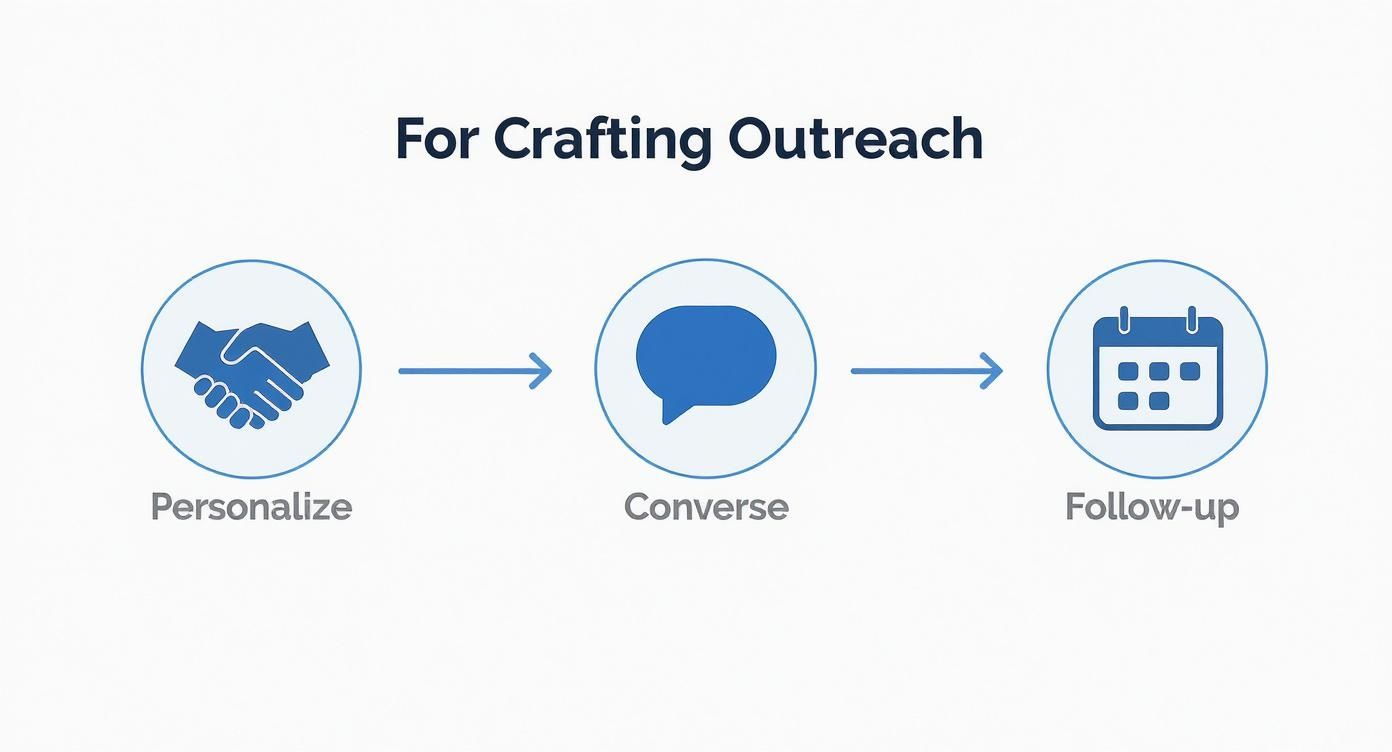
As the flow shows, personalization and conversation come way before any kind of pitch.
Mapping Out Your Cadence
A structured sequence ensures you’re consistent without turning into a pest. Spacing out your touchpoints is absolutely critical.
Here’s a sample 14-day cadence that I’ve seen work wonders. It balances passive engagement with direct outreach, so you're building a relationship, not just sending messages.
Sample 14-Day LinkedIn Prospecting Cadence
This is a great starting point. It’s a mix of different interactions designed to feel natural and non-invasive. Remember, this is a framework, not a strict set of rules—adjust it based on how your prospect responds.
| Day | Action | Objective |
|---|---|---|
| Day 1 | View Profile & Follow | Make your first, subtle appearance on their radar. |
| Day 3 | Engage with Content | Like and leave a thoughtful comment on one of their recent posts. |
| Day 5 | Send Connection Request | Use a personalized note referencing your previous engagement or a shared interest. |
| Day 7 | First Follow-Up (If Connected) | Send a "thanks for connecting" message. Offer a valuable resource without a pitch. |
| Day 11 | Engage Again | Like or comment on another piece of their content to stay visible. |
| Day 14 | Second Follow-Up | Send a message with a clear, low-friction call-to-action (e.g., "Would you be open to a 15-minute chat next week to discuss [specific problem]?"). |
The key here is the variety of touchpoints—it’s not just a relentless stream of DMs. And this multi-channel approach gets results. While cold emails often see response rates hovering around a measly 5.1%, a well-executed LinkedIn DM strategy can hit a 10.3% response rate. Better yet, strategic connection request campaigns see acceptance rates around 30%. You can discover more insights about LinkedIn outreach on expandi.io.
Your own content is your best passive prospecting tool. When you consistently share valuable insights, you attract your ideal customers to you, warming up your outreach before you even start.
Ultimately, a good cadence is about demonstrating genuine interest over time. It shows you’re invested in building a real professional relationship, not just trying to hit a quota. That patience is what separates the pros from the noise.
Using Automation Tools Without Getting Banned
Automating parts of your LinkedIn prospecting can feel like finding a cheat code. Suddenly, you can scale your outreach and connect with hundreds of people while you sleep. But if you get reckless, it’s the fastest way to get your account restricted or shut down for good.
The secret isn’t to automate everything. It’s to automate the right things. Think of automation as your assistant for the boring, repetitive tasks. It should handle the grunt work so you can focus on what actually builds relationships: writing killer messages and having real conversations.
What to Automate vs. What to Do by Hand
You have to draw a hard line here. Automating the wrong task—like a generic first message—instantly flags you as a spammer and can kill a relationship before it even starts.
Safe to Automate:
- Profile Views: This is a low-risk way to show up in your prospect's "Who's viewed your profile" section. It's a subtle, non-invasive first touch.
- Following Profiles: Just like viewing, following someone is a quiet signal of interest that doesn’t clog up their inbox.
- Connection Requests (Carefully!): You can automate sending requests, but only if your tool allows for highly personalized notes. A blank request or a lazy template is worse than no request at all.
Always Requires a Human Touch:
- First Messages: This is your one shot. Your first message after connecting must be personalized based on their profile, recent posts, or a shared connection. No exceptions.
- Follow-Up Conversations: The moment someone replies, the robots get turned off. A real conversation requires nuance, empathy, and listening—things software can’t fake.
- Content Engagement: An automated "Great post!" is transparent and adds zero value. A thoughtful comment that builds on their idea, however, shows you’re actually paying attention.
If you’re just getting started, it helps to see what’s out there. We put together a guide on the best LinkedIn automation tools that prioritize account safety so you can compare your options.
You Can’t Improve What You Don’t Measure
Flying blind with your prospecting is a surefire way to waste weeks of effort. To know if any of this is actually working, you need to track a few key performance indicators (KPIs). These numbers tell the real story.
Your KPIs aren't just vanity metrics; they're direct feedback from your target audience. A low acceptance rate isn't a failure—it's data telling you to fix your targeting or rewrite your connection message.
Start by tracking these three metrics in a simple spreadsheet. It's all you need to get going.
The Only Prospecting KPIs That Matter
| Metric | How to Calculate It | What It Tells You |
|---|---|---|
| Connection Acceptance Rate | (Accepted Requests / Total Requests Sent) * 100 | How well you're targeting and how effective your connection message is. You should be aiming for 20% or higher. |
| Reply Rate | (Replies Received / Total Messages Sent) * 100 | The quality of your first message after connecting. A good benchmark to shoot for is 10-15%. |
| Meeting Booked Rate | (Meetings Booked / Total Replies Received) * 100 | How good you are at turning a conversation into a call. This reveals the true quality of your leads. |
Finding and Fixing the Leaks in Your Funnel
Tracking these numbers is step one. The real magic happens when you use them to spot the bottlenecks in your process and fix them.
Is your Connection Acceptance Rate in the gutter? It's almost always one of two things:
- Your targeting is off. Go back to your Ideal Customer Profile and get more specific with your search filters.
- Your connection message is weak. It sounds generic or self-serving. A/B test a new one.
If people are connecting but your Reply Rate is low, the problem is your first message. It’s likely too salesy, too long, or doesn’t offer any immediate value. Scrap the pitch and try asking a smart, open-ended question instead. For more advanced ways to scale this, certain AI lead generation software can help identify high-intent signals to make your outreach even more relevant.
By checking these numbers weekly, you can make small, informed tweaks. This transforms prospecting from a random guessing game into a predictable system for booking meetings.
Common Questions About Prospecting on LinkedIn
Even with a killer strategy, you're going to hit some roadblocks. LinkedIn has its own culture and unwritten rules, and figuring them out on the fly can be frustrating. This is where most people get stuck.
Let's tackle the most common questions that pop up when you're in the trenches—from message timing to handling the dreaded "profile view, no reply" situation. Getting these details right can be the difference between a full pipeline and an empty inbox.
What's the Best Time to Actually Send a Message?
Everyone's looking for that magic window to send a connection request or DM. While there's no single perfect hour, you can absolutely play the odds in your favor. It's less about a specific time and more about catching people when they're actually at their desk and in a "work" mindset.
We've found a few windows that consistently perform better:
- Mid-week mornings (Tuesday - Thursday, 9 AM - 11 AM): This is prime time. The Monday chaos is over, people have settled into their workflow, but the end-of-week burnout hasn't hit yet.
- The lunch hour (12 PM - 1 PM): Don't sleep on this one. It's a peak time for professionals to take a break and scroll through their LinkedIn feed. Landing in their inbox then is surprisingly effective.
On the flip side, try to avoid Monday mornings (everyone's inbox is a war zone) and late Friday afternoons when people are already mentally checked out for the weekend.
How Much Personalization Is Really Necessary?
This is the big one. The short answer? Enough to prove you’re a human who did at least 30 seconds of homework.
You don’t need to write a novel about their career history. Just find one specific, relevant thing that shows you see them as more than just a name on a list.
I call this the "One Specific Thing" rule. Before you hit send, find one of these:
- A recent post they shared or commented on.
- A company milestone, like a funding announcement or new product.
- A common connection, university, or interest you can genuinely mention.
For example: Instead of: “Hi Sarah, I help companies like yours…”
Try this: “Hi Sarah, saw your post on the challenges of agile marketing. Your point about stakeholder buy-in really hit home.”
See the difference? The second one immediately stands out from the 99% of automated spam she gets every day.
What if They View My Profile but Don’t Respond?
First, don't panic. A profile view is a good sign—it means your initial message or connection request was compelling enough to make them curious. But a view without a reply isn't a rejection. It usually just means they’re busy.
When this happens, don't follow up with the dreaded, "Did you see my last message?" That just sounds desperate.
Instead, try this low-pressure approach:
- Wait a few days. Give them some breathing room. Seriously.
- Engage with their content. Go like or, even better, leave a thoughtful comment on one of their recent posts. This puts your name back on their radar in a natural, non-pushy way.
- Follow up with value. After another day or two, send a short message that gives instead of asks. Something like, "Hey, following up on my last note—I just read this article on [relevant topic] and thought of you. Hope it's useful!"
This reframes the entire interaction. You're no longer a salesperson asking for their time; you're a helpful peer sharing a resource. It completely changes the dynamic and keeps the door open.
Is It Okay to Follow Up More Than Once?
Absolutely. In fact, you should. A single follow-up is rarely enough. The key is to be persistent without being a pest.
A good cadence is two or three follow-ups spaced a few days apart over a couple of weeks. If you get radio silence after that, it's time to respectfully move on. Pestering someone beyond that point will only burn the bridge and hurt your reputation.
If you want to dive even deeper into the nuts and bolts, this comprehensive guide to prospecting on LinkedIn offers some great frameworks and ideas you can start testing right away.
Ready to turn your LinkedIn activity into a predictable source of inbound leads? GetViews.AI uses an AI Story Engine and smart automation to create high-performing content that attracts your ideal buyers, so you can build pipeline without cold outreach. Start your free trial and see how it works at https://getviews.ai.