Your AI LinkedIn Post Generator Playbook
Transform your LinkedIn content with this AI LinkedIn post generator playbook. Learn expert strategies for drafting, optimizing, and scaling your posts.
Wilmer KarlssonTarstad
An AI LinkedIn post generator is a tool that helps you create content for your profile using artificial intelligence. Instead of staring at a blank screen, you give it a topic and a desired tone, and it instantly spits out drafts. It’s designed to save you from writer’s block and keep you posting consistently.
How Do These AI Post Generators Actually Work?
It’s tempting to think of these tools as simple text spinners, but what’s happening behind the scenes is way more sophisticated. They aren’t just shuffling words around. These generators are built on powerful machine learning models that have been fed massive amounts of data.
And that data is incredibly specific: millions of successful LinkedIn posts, articles, and high-performing user profiles. The AI essentially studies what works—identifying the patterns in content that consistently gets likes, comments, and shares. It learns to recognize the hooks, structures, and calls to action that make people stop scrolling and engage.
The Tech Powering Your Posts
At its core, this whole process runs on something called Natural Language Processing (NLP). You can think of NLP as the bridge that lets a machine understand and write like a human. When you type in a prompt, the NLP model figures out what you want to talk about and the style you're going for.
From there, it puts its training to work to:
- Suggest Relevant Topics: The AI can look at current industry trends and your own past content to come up with ideas that will actually land with your network.
- Draft Compelling Hooks: It knows that first sentence is everything. The model generates opening lines designed to grab attention, usually by asking a sharp question or making a bold statement.
- Structure for Readability: The AI gets that nobody on LinkedIn reads huge walls of text. It uses short paragraphs, bullet points, and plenty of white space to make your posts easy to scan and digest.
The goal isn't just to write text. It's to write text that's optimized for how LinkedIn’s algorithm and its users actually behave. The AI is like a co-pilot, using data from countless successful posts to inform your content.
Understanding this is key. You're not just handing over the keys to a machine. You’re using a data-driven tool to sharpen your own creativity. Knowing how it works helps you write better prompts and make smarter edits. It shifts you from being a passive user to a strategic operator who can truly squeeze the most out of the technology—while also knowing its limits and when your own human insight is what’s needed most.
Generating Your First Draft in Minutes
This is where you start getting your time back. Forget the dreaded blank screen and that blinking cursor. A good AI LinkedIn post generator can take a simple idea and spit out a solid first draft in moments.
The real trick, though, isn't just giving the AI a topic. The quality of your output depends entirely on the quality of your input. Think of it like giving directions—the more specific you are, the better the result. Your goal here isn't a perfect post, but a strong foundation that saves you hours of brainstorming.
Crafting a High-Quality Prompt
To get the best results, every prompt you write needs three core ingredients: who you're talking to, what you're talking about, and how you want to sound.
Let's walk through a real-world example. Imagine you’re a marketing manager trying to get traction for a new whitepaper on B2B sales cycles. A vague prompt like "write about our new whitepaper" will get you garbage.
Instead, try this:
- Audience: "Write for VPs of Sales and Revenue Operations leaders at mid-market SaaS companies."
- Content Pillar: "This is a thought leadership post. I want to highlight one surprising statistic from our new whitepaper and explain its implications for sales teams in 2024."
- Tone: "Use an authoritative but conversational tone. Keep it concise and actionable, ending with a question to drive comments."
See the difference? This level of detail guides the AI to create something strategically aligned with your goals, not just another generic post. These tools work because they've analyzed millions of viral posts and can match content to specific writing styles and hot topics.
A great prompt doesn't just tell the AI what to write about; it tells the AI how to think about the topic for a specific audience. This simple shift is the difference between a generic, unusable draft and a nearly-finished post.
From Prompt to Multiple Drafts
Once you nail your prompt, a good AI generator won't just give you one option back. It should provide several different drafts. You might get one that opens with a provocative question, another that starts with a personal story, and a third that’s heavy on the data. This immediately gives you options to play with.
The visual below breaks down this simple but powerful process—turning your detailed input into actual content.
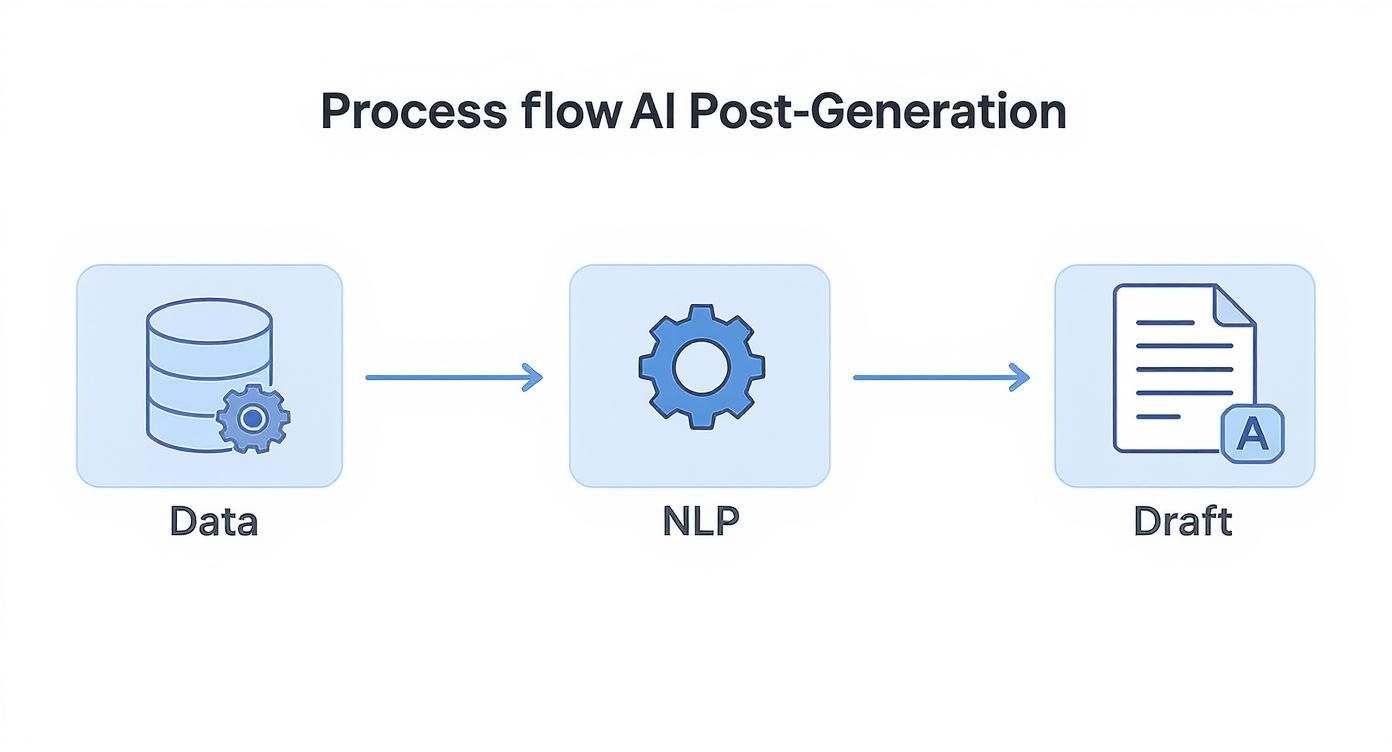
This flow shows exactly how the AI takes your instructions, processes the information, and structures the final text. Your job is to look over these initial drafts, pull out the bits you like from each, and get ready to start refining.
Even the headline can get an instant upgrade. If you need inspiration, check out our guide on creating a powerful LinkedIn headline.
Refining and Humanizing Your AI Content
Think of an AI draft as a great starting point, but never the finished product. The real magic happens when you step in and weave your own experience and personality into that clean, structured text. This is how you go from a generic post to content that actually builds trust and makes people see you as an authority.
Treat the output from an AI LinkedIn post generator like a well-organized skeleton. Your job is to add the muscle, the personality, the you. Without your insights, stories, and authentic voice, the content will feel sterile and forgettable—just more noise in an already crowded feed.
That human element is what creates a real connection, and it’s something AI just can't fake.

Injecting Your Unique Voice
First, read the draft out loud. Seriously. Does it sound like something you'd actually say to a colleague? AI tends to default to a formal, slightly stiff tone. Your first mission is to chop up clunky sentences and swap out corporate jargon for the words you use every day.
This is also your chance to add personal stories. An AI can spit out a business principle, but it can't share the story of that one time you learned that lesson the hard way. A short, relevant anecdote makes your content 100% unique and way more relatable.
- Before (The AI Draft): "Strategic alignment is crucial for project success. Misaligned teams often face significant hurdles."
- After (Your Human Touch): "I once watched a six-figure project completely implode because our sales and product teams had totally different goals. Taught me a hard lesson: alignment isn't just a buzzword; it's the foundation of everything."
See the difference? One is a textbook definition. The other is a memorable story with a real takeaway.
Fact-Checking and Adding Specificity
Never, ever trust an AI's claims blindly. The tech is getting smarter, but it can still pull outdated stats or just plain make things up. Always double-check any numbers or facts before you hit "publish."
But it's not just about verifying facts. You need to layer in your own industry-specific knowledge. The AI doesn't know the inside jokes in your field or the nitty-gritty challenges your ideal customer is dealing with this week. Sprinkling in these details is what shows you're a true expert, not just someone with a fancy tool.
The goal is to bridge the gap between what the algorithm knows and what your audience feels. Your experiences, your voice, and your specific knowledge are the ingredients AI can't supply.
Optimizing for LinkedIn Engagement
Finally, you need to tweak the post for the platform itself. This goes beyond good writing; it's about playing LinkedIn's game. Your post has to be scannable—nobody's reading a wall of text on their phone during a coffee break.
Run through this quick checklist before you post:
- Break Up Your Paragraphs: Keep them short and sweet, just one or two sentences max. White space is your friend.
- Add Relevant Hashtags: Use three to five targeted hashtags that your audience actually follows.
- Tag People and Companies: If you mention someone, tag them. It expands your reach instantly.
- End with a Question: Your call to action shouldn't just be a statement. Ask a question that practically begs for a comment and gets a conversation started.
Getting these refinement steps right is a game-changer. For a deeper look at crafting posts that really connect, check out our guide on how to write effective LinkedIn posts. When you blend the speed of AI with your own human insight, you create content that doesn’t just get seen—it gets remembered.
Automating Your Posting and Amplifying Reach
Let’s be honest: churning out great content with an AI LinkedIn post generator is only half the job. If your posts go out to an empty room, it doesn't matter how brilliant they are.
The next step—and the one most people skip—is building a smart, automated distribution strategy. This is how you make sure your message consistently lands in front of the right people, without you having to live on LinkedIn every single day.
Consistency is everything on LinkedIn. The algorithm loves it. Many AI generators come with built-in schedulers, which are perfect for batching your work. Spend a couple of hours writing and loading up a week's worth of content, then let the tool post for you at the best times. This simple step keeps your profile buzzing with activity, which is exactly what you need to stay visible in the feed.
Go Beyond a Single Post
Once a post is live, your work isn’t over. Real growth comes from amplification. Don't just post and pray. Think of each AI-generated post as a piece of "pillar content" you can slice, dice, and spread across LinkedIn.
Here are a few tactics I’ve seen work wonders:
- Expand it into a LinkedIn Article: Got a post that really resonated? Take that core idea and flesh it out into a full-blown LinkedIn Article. This is your chance to showcase deeper expertise, and these articles can even start ranking in Google search.
- Share it in Relevant Groups: Pinpoint three to five active LinkedIn Groups where your ideal clients hang out. Don't just dump the link—share your post with a short, engaging intro asking for their take on the topic.
- Activate Your Internal Team: This is a huge one. Get your colleagues to like and comment on your post within the first hour it goes live. That early burst of engagement tells the algorithm, "Hey, this is good stuff!" and gives it a massive visibility boost.
If you want to really nail down your content calendar, we put together a complete guide on how to automate your LinkedIn posts.
Your goal isn't just to make a series of disconnected posts. You're building a content ecosystem where each piece supports the others, stretching its impact and lifespan.
Choosing the Right Automation Tools
The market for AI LinkedIn tools is getting crowded, which is great news—there are options for just about every budget and need. Most of these platforms run on tiered subscription models, so you only pay for what you actually use.
To give you an idea of what’s out there, here’s a quick breakdown of the common pricing tiers and who they're built for.
AI Generator Pricing Tiers and Target Users
| Tier Level | Typical Price Range (Monthly) | Core Features | Ideal User Profile |
|---|---|---|---|
| Starter / Individual | $19 - $49 | Basic post generation, limited scheduling, simple analytics. | Solopreneurs, freelancers, or individuals just starting to build their personal brand. |
| Pro / Small Business | $49 - $199 | Advanced AI prompts, unlimited scheduling, content calendar, basic team collaboration, engagement analytics. | Small business owners, marketing managers, or consultants managing a few client accounts. |
| Business / Agency | $199 - $499+ | All Pro features plus custom AI voice models, team workflows, advanced analytics, CRM integrations. | Marketing agencies, sales teams, and larger companies needing brand consistency and deep performance tracking. |
For example, a tool like MagicPost offers plans starting from $19 per month for individuals, scaling up to $199 per month for pro-level features. On the higher end, you'll find enterprise packages that can run upwards of $499 per month, often including custom-trained AI models and detailed pipeline analytics.
The right tool for you really comes down to your goals. Are you just looking to schedule a few posts a week, or are you building a full-blown content machine with your team that ties directly into your CRM? Your answer will point you to the right plan.
Measuring Performance and Proving Your ROI
Alright, let's talk about the part that actually matters: making sure this whole thing is working.
Creating great content with an AI post generator feels good, but if you can't prove it's bringing in business, you're just playing a guessing game. To justify the investment—even if it's just your time—you have to connect your LinkedIn activity directly to your pipeline.
This means we need to stop obsessing over vanity metrics and start tracking the numbers that actually move the needle.
Think about it. A post with 10,000 views and two generic comments is a ghost town. But a post with 1,000 views that sparks five real conversations in your DMs? That's where the magic happens. The goal isn't just to be seen; it's to start conversations that lead somewhere.
Metrics That Actually Tell You Something
For a minute, I want you to completely forget about likes and total views. They give you a quick dopamine hit but tell you almost nothing about the quality of your audience or their intent.
Instead, build your performance dashboard around these indicators. These are the signals that tell you you're on the right track.
- Engagement Rate: This is your true pulse check. The formula is simple: (Comments + Shares) / Total Views. A high engagement rate means your content didn't just fly by—it stopped the scroll and made someone think, react, and act.
- Profile Clicks: This is a massive signal of intent. Someone who clicks from your post to your profile is curious. They want to know who you are and what you do. It’s the digital equivalent of them walking up to your booth at a conference.
- New Connection Requests: Keep an eye on how many inbound connection requests you get after a post goes live. Pay special attention to the ones that come with a personalized note referencing your content. These aren't just contacts; they're warm leads knocking on your door.
- Direct Messages (DMs): This is where business gets done. How many private, one-on-one conversations did your public post generate? This is the ultimate goal.
When you track these metrics, you’ll quickly see which AI-generated posts consistently get your target audience to take a tangible step forward.
Becoming a Content Detective
After you’ve been posting for a few weeks, it's time to put on your detective hat. Dig into your LinkedIn analytics or use your scheduling tool's reporting features to look for patterns. The real insights don't come from looking at one post in isolation, but from comparing them to see what really resonates.
Start asking yourself the right questions:
- Which topics consistently sparked the most comments and debates?
- Did posts that told a personal story lead to more DMs than the data-heavy ones?
- Is there a specific day of the week or time of day that consistently gives me a higher engagement rate?
This analysis is your feedback loop. It's gold.
The insights you find should go directly back into the prompts you write for your AI LinkedIn post generator. For example, if you realize that posts ending with a direct question get 3x more comments, you should make that a standard instruction in your prompt template from now on.
Your LinkedIn analytics aren't just a report card; they are a roadmap. Use the data to refine your prompts, double down on what works, and systematically improve your results over time.
Ultimately, proving your ROI is all about connecting the dots. Track how many of those DMs turn into discovery calls. Follow how many of those new connections eventually become customers. See how many profile clicks lead to website traffic that actually converts.
This is how you stop treating LinkedIn like a social network and start running it like a predictable, pipeline-building machine.
Got Questions About AI Post Generators? You're Not Alone.
Jumping into AI for your LinkedIn content is smart, but it's natural to have a few questions. Speed and efficiency are great, but what about authenticity? What about actual results? And what does this mean for the personal brand you've worked hard to build?
Let's get straight to the most common concerns I hear from professionals every day.
"Will This Make Me Sound Like a Robot?"
This is always the first question, and for good reason. Your reputation is on the line.
The honest answer? It only sounds robotic if you let it. An AI-generated draft is just a starting block. The magic happens when you inject your own voice, your personal stories, and the specific insights only someone with your experience can offer.
Think of the AI as a brilliant, fast-as-lightning junior copywriter. It can build the structure, but you—the expert—need to give it a soul.
"Okay, But Will It Actually Get Engagement?"
This is the next big one. What’s the point of saving time if your posts land with a thud and get zero traction? It's a totally valid concern.
Here’s the thing: these tools are trained on massive datasets of what already works on LinkedIn. They're designed from the ground up to replicate the hooks, structures, and formatting that are proven to grab attention.
- It understands structure. The AI knows to use short paragraphs, lots of white space, and clear calls to action because that’s exactly what the LinkedIn algorithm and human readers reward.
- It knows how to write hooks. It’s built to generate those crucial first lines that stop the scroll in a noisy feed.
The AI gives you the perfect framework. You provide the substance. High-engagement posts are always a blend of a well-structured format and a genuinely valuable, human insight.
The winning strategy is a human-AI team-up. Let the AI handle the structural heavy lifting and the speed. That frees you up to focus on the one thing it can't do: sharing your core message and personal stories.
"How Long Should My Posts Even Be?"
Lots of people wonder about the ideal post length, and the data points to a clear sweet spot. Posts between 200 and 400 words consistently perform well. They're meaty enough to deliver real value but still short enough to be easily scanned on a phone.
An AI generator is perfect for this because you can simply tell it to create drafts of a certain length, helping you stay consistent.
Just remember to use formatting like bullet points and snappy sentences to keep it readable, no matter the length. At the end of the day, the best AI-powered content feels human, offers real value, and respects your audience's time.
Ready to stop treating LinkedIn like a chore and start building a predictable pipeline? GetViews.AI provides the system to create content, amplify your voice, and turn that engagement into real business. Start building your authority on autopilot with GetViews.AI.